
Dental Shooting
Dental Shooting SRLsMedical
1.76.00 Reviews
- Version
- 2.9.10
- Installs
- 10.00K
- Age Rating
- Everyone
Screenshots
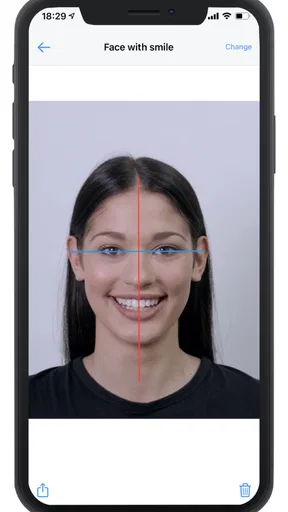
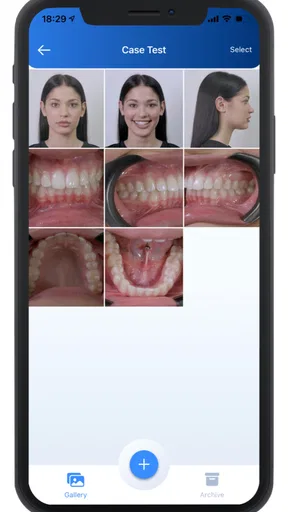
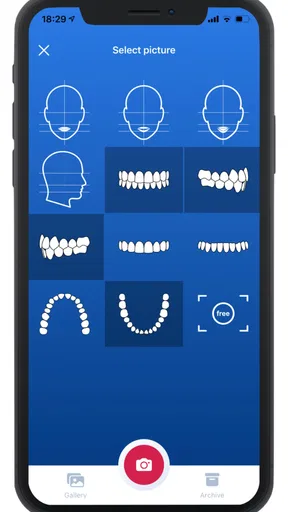
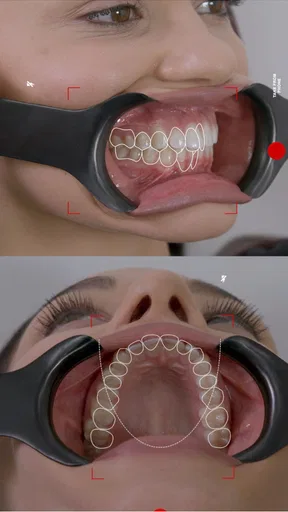
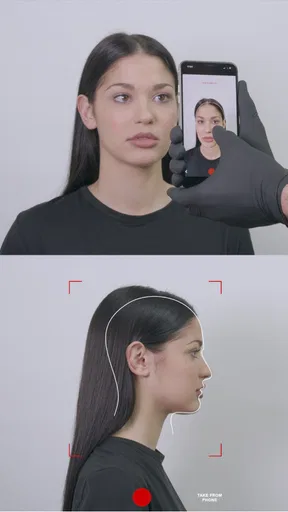
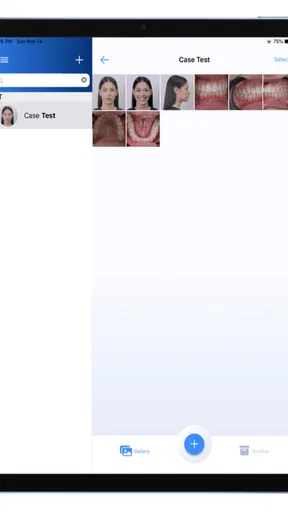
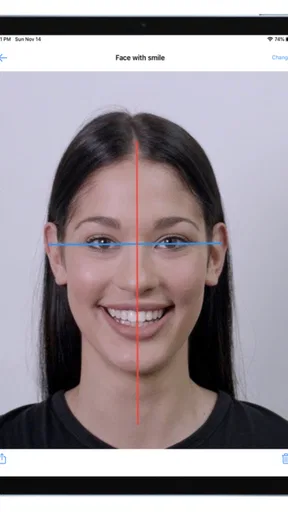
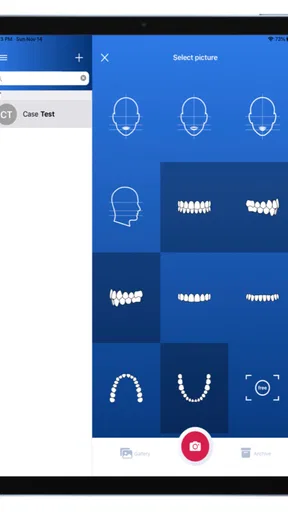
Our Review of Dental Shooting
 Analysis by Appyee
Dental photography is one of those tasks that looks simple until you need the same view, lighting, and framing more than once. Dental Shooting is a medical app from Dental Shooting SRLs built around taking dental photos and editing them, and my first impression is that it aims at a very specific professional routine rather than general phone photography. It is free to install, available for Everyone, and supports Android devices running version 5.0 or later.
That narrow purpose is both its appeal and its biggest limitation. If you are a dental professional who regularly documents cases, the app is easier to justify than a normal camera because it keeps the photographic task tied to a clinical workflow. If you only need occasional mouth photos for personal reference, however, it may feel like more equipment than you need. After using it beyond the initial novelty, I found that its lasting value depends less on taking one impressive image and more on whether it becomes part of a repeatable habit.
From a promising first week to a demanding routine
I find the first week is a useful test of whether a focused dental-photo workflow fits the way I actually work, but initial convenience is not the same as lasting value. In this section, I look at how the app’s narrow purpose can help establish a repeatable habit, and why that habit still depends on careful positioning and restrained editing. The longer-term question is whether those small gains hold up in a busy routine.
Why the first sessions feel useful
The first-week appeal comes from focus. A regular phone camera gives you a broad set of controls and leaves you to decide how to approach a dental image. This app starts from the opposite direction: dental photos are the reason it exists. That change in mindset matters when I am trying to document a tooth, an arch, or a treatment stage without getting distracted by unrelated camera features.
The editing side is also important. A raw clinical photograph can contain distracting background detail, uneven framing, or a composition that is difficult to compare with a later image. Having capture and editing in the same app means I can think about the finished record immediately instead of moving between a camera, a gallery, and a separate image editor. That is a small workflow improvement, but repeated small improvements are what make a specialist tool worth keeping.
I would not treat the app as a substitute for clinical judgement or proper photographic technique. It can help organize the act of making a dental image, but it does not turn an unsteady hand, poor positioning, or unsuitable lighting into a reliable clinical record. The best results still depend on how carefully I prepare the subject and keep the view consistent.
A practical use case in a busy clinic
Imagine a patient returning for a progress appointment. Instead of searching through unrelated camera images, I can use a dental-focused workflow to capture a new view and edit it before it becomes part of the case record. The useful part is not merely speed. It is the chance to compare images that were made with the same purpose, rather than mixing casual snapshots with documentation.
That scenario also reveals a trade-off. A specialist camera app can encourage better discipline, but only if I use it the same way each time. If I change distance, angle, or cropping from one visit to the next, the presence of an editing tool does not solve the comparison problem. My practical advice is to decide on a small set of repeatable views before relying on the app. Consistency will improve the value of the images more than aggressive editing.
What the editing step should and should not do
I see editing as a preparation step, not an invitation to make clinical photographs look dramatic. Cropping can remove irrelevant edges, while careful adjustments can make the intended area easier to inspect. The temptation is to over-edit, especially when an image looks less polished than a normal portrait. For dental documentation, a natural and honest image is usually more useful than a visually attractive one.
This is one of the app’s less obvious lessons: editing creates responsibility. Once an image has been changed, I need to remember whether I am looking at an original capture or a presentation version. For discussions, education, or patient communication, an edited image may be convenient. For records that need faithful documentation, I would keep the original alongside any edited copy whenever the workflow allows it.
Who will appreciate it immediately
The strongest early audience is a dental professional who already takes intraoral or extraoral photographs and wants a dedicated place to perform that task. Students and trainees may also find the focused approach useful while learning how to build a consistent photographic routine. The app’s free entry point makes it relatively easy to test without committing immediately to a paid camera system.
It is less convincing for someone who takes one dental image every few months. A standard phone camera may be quicker for a rare, informal reference, particularly when the user already knows how to crop and share images. I also would not choose this as a general photo editor. Its value comes from the dental context, not from replacing a full-purpose editing application.
Device expectations and the first setup decision
The current version is 2.9.10, and the minimum Android requirement is 5.0. That broad compatibility is helpful for clinics or learners using older devices, although compatibility alone does not guarantee a smooth experience on every phone. Camera hardware, screen quality, storage condition, and the physical setup around the patient can all affect how comfortable the workflow feels.
Before making it part of a daily routine, I would test the app on the exact phone used for clinical work. I would check whether the camera view is easy to position, whether edited images are simple to find afterward, and whether the result fits the existing record-keeping process. This trial is more valuable than judging the app from a single attractive photograph.
Does it keep earning its place after the first month?
After the first month, I judge a photography tool less by novelty than by whether it keeps images consistent, manageable, and worth the time it adds. Here I consider the practical pressures that can make a specialist app either earn its place or become an unnecessary extra step, including team habits, purchase decisions, and responsible image handling. That leads to a closer look at what lasting use really requires.
Recurring value comes from standardization
After the first month, the novelty of a dedicated dental camera fades. At that point, the question is not whether I can take a dental photo, but whether this app helps me take comparable photos repeatedly. Its long-term usefulness rests on that repeatability. A tool that encourages the same preparation, capture, review, and editing sequence can become a quiet part of a working day.
I would build a simple routine around it: prepare the area, capture the intended view, review the image before moving on, make only necessary edits, and label or transfer the result according to the clinic’s normal process. The app cannot create that routine for me, but its focused purpose can make the routine easier to remember. This is a more durable benefit than the initial satisfaction of finding a specialized camera interface.
There is also a teaching advantage. When every image is made with the same basic intention, it becomes easier to notice whether a problem came from positioning, lighting, patient movement, or editing. That makes the app useful not only as a capture tool but as a way to improve the photographer’s own habits. The insight is easy to miss because the store summary emphasizes the action of taking and editing, while the real benefit may be learning to produce a more dependable series.
Sharing and reviewing without losing context
A dental photograph rarely exists in isolation. It may be reviewed with a patient, discussed with a colleague, used during a consultation, or placed beside an image from an earlier visit. The app is most valuable when it supports that larger conversation without encouraging me to treat the image as self-explanatory.
For patient communication, a clean crop and a clear view can make an explanation easier. For professional review, the original context matters more, so I would avoid relying only on a heavily edited version. This distinction helps prevent a common workflow mistake: preparing an image for presentation and then accidentally treating that presentation copy as the complete record.
I would also establish a naming and storage habit outside the moment of capture. Even a good dental photo becomes difficult to use if it cannot be connected to the right patient, visit, or treatment stage. The app’s capture function may start the process, but the surrounding organization determines whether the image remains useful months later.
Where the free model stops feeling simple
The app is free to install, which lowers the barrier to trying it. However, in-app purchases are listed from $49.99 to $139.99 per item. That changes the decision for anyone considering it as a long-term professional tool. I would not assume that installing the app means the complete workflow is free; I would inspect the available purchase options and decide whether the paid elements match a real recurring need before building the practice around them.
This pricing structure creates a clear trade-off. A professional may accept a substantial purchase if the app saves time or improves consistency across many cases. A student, occasional user, or small practice may be more cautious, especially if a normal camera and existing editing tools already cover the basic requirement. The right comparison is not “free app versus expensive app.” It is “specialist workflow versus the tools I already use, measured over repeated work.”
Because the listed purchase range is significant for an app that begins with free installation, I would test the free experience with actual clinical scenarios rather than judging it from a quick demonstration. Take several different views, edit them conservatively, and see whether the workflow remains comfortable when repeated. That is the point at which the paid choice becomes easier to evaluate.
The maintenance burden is mostly behavioral
The biggest maintenance task is not learning a complicated feature set. It is keeping the photographic process consistent. If different staff members use different angles, distances, or editing choices, the app may become a collection of images instead of a dependable documentation system. A short internal guide or shared routine could matter more than another editing option.
I would also schedule occasional checks of the image workflow: confirm that photos can still be located, that the chosen device remains practical, and that the team is not saving multiple confusing versions. This is especially important when the app is used in a clinic where several people may handle capture and review. The more users involved, the more valuable a simple, agreed method becomes.
There is a privacy dimension to any medical photography workflow, even when the app’s main attraction is convenience. I would use it within the clinic’s established rules for patient images and avoid treating the phone gallery as an informal archive. The app can assist with photography, but responsible handling of the resulting images remains part of the user’s job.
What causes fatigue over time
The first source of fatigue is repetition without a clear payoff. If I already produce consistent dental photos with the standard camera, opening a separate app can feel like an extra step. The specialist workflow needs to save enough effort or improve enough consistency to justify that additional habit.
The second is editing temptation. When an app makes adjustment easy, it is possible to spend too long polishing images that only needed a clean crop. In a busy setting, that can turn a useful step into a bottleneck. My rule would be to edit for clarity and comparison, not perfection.
The third is uncertainty around the paid path. A free installation is easy to try, but a recurring professional workflow needs predictable value. If the features I rely on sit behind a purchase that feels disproportionate to my use, I may eventually return to the phone’s built-in camera or a broader dental documentation system.
The public response also deserves a realistic reading. Dental Shooting has an average rating of 1.7 from over 75 ratings and six written reviews, while its install count is over 10 thousand. Those figures do not tell me exactly why individual users were dissatisfied, but they do make me cautious about recommending it blindly. I would test it on the intended device and workflow before asking a whole team to depend on it.
How it compares with the usual alternatives
The usual alternative is the phone’s native camera. It is familiar, quick, and already integrated with the device, making it a sensible choice for occasional photos or informal communication. Its weakness is that it does not begin from the needs of dental documentation, so consistency depends entirely on the user’s own method.
A general photo editor is another option. It may offer more creative control than a specialized medical app, but it also adds a separate step and can encourage edits that are inappropriate for clinical records. Dental Shooting makes more sense when the user values a focused capture-to-edit path over a large collection of general image tools.
At the other end, a dedicated clinical imaging system may be a better fit for a larger practice that needs a broader, more structured record process. Such a system can be preferable when multiple people, rooms, or long-running cases require formal organization. I would choose this app instead when the immediate need is a focused dental photography tool that can be tested without adopting an entire platform.
Questions I would answer before relying on it
Can a beginner use it? Yes, the purpose is easy to understand, but good results still require basic dental photography discipline. I would not expect the app alone to teach positioning or guarantee repeatable images.
Is it suitable for personal use? It can be useful for a patient or learner who has a clear reason to document dental changes, but I would not use it casually or store sensitive images without a sensible privacy routine. For occasional, non-clinical reference, the standard camera may be less effort.
Does free installation mean there is no professional cost? No. The app includes in-app purchases priced between $49.99 and $139.99 per item, so I would investigate the purchase path before committing to it as a regular clinic tool.
Will it replace a dental record system? I would not treat it that way. Its role is photography and editing. The surrounding patient record, organization, and secure handling still need their own dependable process.
Is it worth keeping installed? For a dental professional who takes these images frequently and benefits from a dedicated routine, possibly yes. For everyone else, the answer depends on whether the focused workflow produces a clear improvement over the camera already on the phone.
My long-term verdict
Dental Shooting earns lasting space only when dental photography is a repeated task, not a one-time experiment. I like its focused purpose and the idea of moving from capture to careful editing without treating the image like an ordinary snapshot. The strongest benefit is the opportunity to build a consistent photographic habit, especially when images need to be reviewed across appointments.
Still, I would approach it as a trial rather than an automatic recommendation. The low average rating, the possibility of paid purchases, and the maintenance required around naming, privacy, positioning, and editing all matter. A clinic should test the complete routine before adopting it widely, while occasional users should compare it honestly with the phone’s native camera.
My final recommendation is therefore specific: try it if you are actively building a dental photography workflow and are willing to maintain that workflow carefully. Skip it if you only need rare snapshots, want a general-purpose editor, or expect the app to solve the clinical and organizational parts of documentation by itself. Its value is real but specialized, and it appears after repetition—not simply after installation.
Verdict
Strengths of Dental Shooting
- Quick reflex-based gameplay that is easy to understand from the start.
- Short rounds make it convenient for casual play sessions.
- Simple controls work well on touchscreen devices.
- Lighthearted dental theme gives the game a distinctive style.
- Progression encourages players to improve their timing and accuracy.
Limitations of Dental Shooting
- Gameplay may become repetitive after extended play.
- Limited strategic depth may not appeal to experienced gamers.
- Some visual effects could feel uncomfortable for sensitive players.
- Difficulty may increase abruptly in later stages.
- The game may offer limited replay value without frequent updates.
Similar Picks in This Category
View All
WebMD: Symptom Checker
WebMD, LLC4.1

Microphone Amplifier
DOSA Apps4.2

Anatomy Learning - 3D Anatomy
3D Medical OU4.5

Period Tracker and Calendar
SimpleInnovation4.9

GoodRx: Prescription Coupons
GoodRx4.8

CVS Health
CVS Pharmacy4.5
Frequently Asked Questions
What is Dental Shooting?
Dental Shooting is a casual mobile game built around a humorous dental-themed shooting concept. After installing it, players can expect short, arcade-style gameplay rather than a realistic dental simulator. The main appeal is its simple controls, quick rounds, and playful presentation. It is designed for users looking for light entertainment and an unusual theme, not professional dental education or clinical advice.
How do you play Dental Shooting?
The game generally focuses on aiming and shooting targets connected with the dental theme. Gameplay is easy to understand, making it suitable for quick sessions on a phone or tablet. Players typically need to react accurately, complete objectives, and progress through increasingly challenging stages. Before downloading, remember that the experience is centered on casual action and timing, so it may feel repetitive to players who prefer deep strategy or complex controls.
Is Dental Shooting free to download and play?
Dental Shooting can usually be downloaded without an upfront purchase, although the exact availability and pricing may depend on whether you are using Android or iOS. Free mobile games may include advertising, optional in-app purchases, or paid items that affect convenience rather than the basic ability to play. It is advisable to check the store listing for current pricing, payment details, and any regional restrictions before installing.
Is Dental Shooting suitable for children?
The game may be appropriate for older children depending on its official age rating, visual style, advertising, and available purchase options. Although the dental theme is presented in a playful way, parents should review the store classification and supervise younger players, especially if the app displays third-party advertisements or allows in-app purchases. The game should not be treated as a substitute for learning proper oral hygiene or receiving medical guidance.
Does Dental Shooting require an internet connection?
Whether Dental Shooting works completely offline depends on the version installed and how its advertisements, progress synchronization, or online features are implemented. Some basic gameplay may function without a connection, while launching the app, loading ads, updating content, or restoring purchases could require internet access. For the most accurate information, check the current Google Play or App Store description and test the game after installation with connectivity disabled.
